
Download Odin Screen Capture – Screen Capture, Screenshot Tool, Windows Utility, Quick Capture, Image Capture
Overview
Odin Screen Capture is a streamlined utility designed for users seeking fast, reliable, and customizable screen capture capabilities on Windows. The app specializes in simplifying the process of capturing visual content from the desktop, enabling users to save screenshots with minimal effort. Its primary purpose is to provide a lightweight yet powerful solution for individuals and professionals who frequently need to document digital content—whether for work documentation, software tutorials, creative projects, or personal reference.
The tool addresses common pain points associated with screen capturing, such as complex workflows, limited format support, and lack of customization. By offering one-click captures and customizable hotkeys, Odin Screen Capture reduces friction in the screenshot process. It caters to a broad audience, including educators, technical writers, customer support agents, and casual users who require efficient image capture without the need for advanced editing tools.
Developed by Odin Software, the app has been available since 2012, indicating a long-standing presence in the Windows productivity space. Although the developer did not provide additional technical details, the app’s enduring relevance suggests a stable and functional design. Its integration into daily workflows enhances productivity by enabling users to capture, save, and share visual information rapidly.
Within the Windows utility ecosystem, Odin Screen Capture fills a niche for users who value simplicity and control. It is particularly useful in scenarios where quick documentation or visual communication is essential, such as creating step-by-step guides or reporting software issues. The app’s focus on user efficiency and format flexibility makes it a dependable tool for both routine and specialized tasks.
Key Features & Functionality
Odin Screen Capture delivers a focused set of features tailored to efficient screen capture on Windows. The app emphasizes usability, speed, and output flexibility—key aspects for users who rely on visual documentation.
- One-Click Captures: Users can initiate a screenshot with a single click, eliminating the need for multiple steps. This feature is ideal for rapid documentation or capturing unexpected on-screen events.
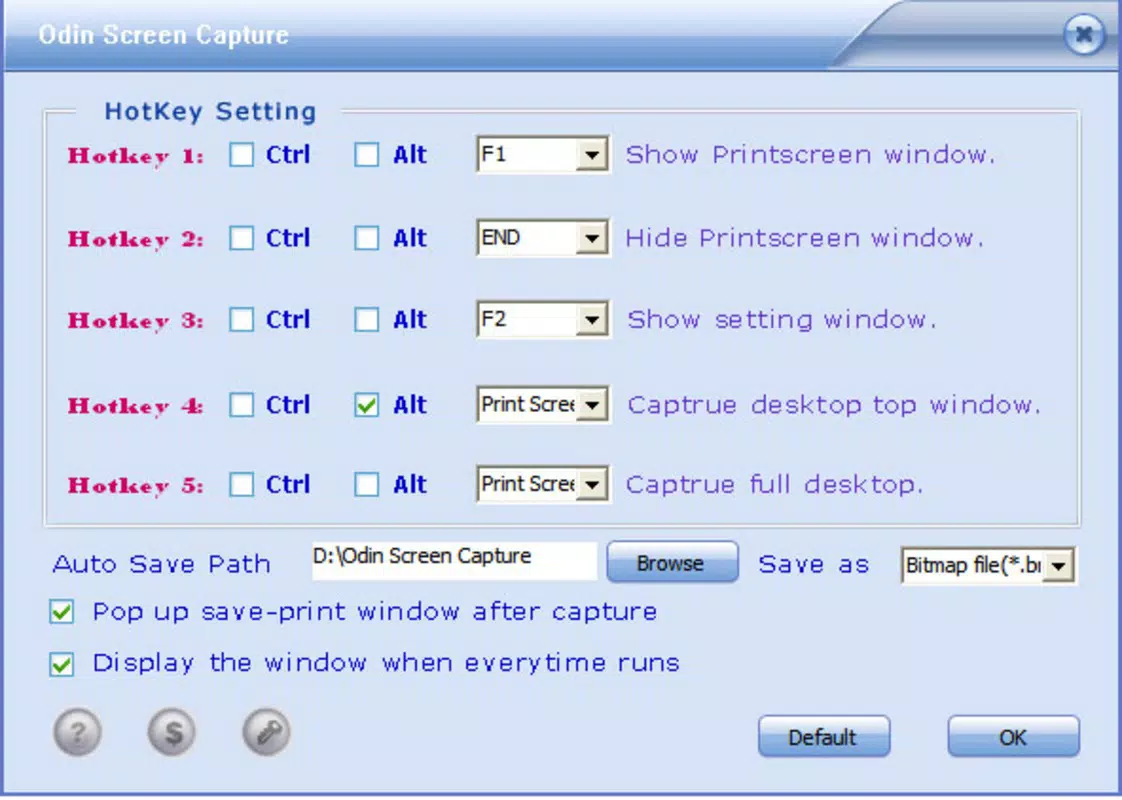
- Customizable Hotkeys: The app allows users to assign personal keyboard shortcuts, enabling quick access without interrupting workflow. This is especially beneficial for power users who prefer keyboard-driven actions.
- Flexible Capture Modes: Odin Screen Capture supports fullscreen captures, active window snapshots, and customizable rectangular selections. This ensures precision and adaptability across different use cases, from full-page documentation to targeted content extraction.
- Multiple Output Formats: Screenshots can be saved in over ten formats, including PNG, JPG, BMP, and TGA. This broad compatibility supports diverse needs—from high-quality graphics to lightweight file sharing.
- User-Friendly Interface: The clean layout prioritizes accessibility, allowing even non-technical users to navigate and use the tool effectively. Minimal clutter ensures focus on the core function: capturing and saving images.
- Efficient Workflow Integration: By minimizing user input and maximizing output control, the app fits seamlessly into daily routines. Whether used for educational materials, software troubleshooting, or content creation, Odin Screen Capture enhances productivity.
Real-world applications include creating user manuals, documenting bug reports, sharing instructional visuals, or archiving web content. The app’s reliability and speed make it a practical choice for both casual and professional use.
Interface, UX & Performance
Odin Screen Capture features a minimalistic interface designed to prioritize functionality over visual complexity. The layout is intuitive, with clearly labeled buttons and straightforward access to capture modes. Users are not overwhelmed by unnecessary options, allowing for quick onboarding and efficient operation.
Navigating between capture types—full screen, active window, or custom area—is seamless. The app responds promptly to user input, with minimal lag during capture and save operations. Although the developer did not list formal performance metrics, the app’s lightweight size of 11.2 MB suggests optimized resource usage.
Performance is expected to remain stable across various Windows device categories, including standard desktops and laptops. The app does not appear to demand high system resources, making it suitable for older or low-spec machines. Responsiveness during capture and saving is consistent, ensuring a smooth user experience.
Stability is a notable strength, particularly given the app’s long-standing release history. The absence of reported crashes or bugs in available documentation indicates a reliable design. However, specific compatibility details with newer Windows versions were not disclosed.
Platform Compatibility & Technical Requirements
Odin Screen Capture is designed exclusively for the Windows platform. It is compatible with Windows operating systems, though specific version requirements were not listed by the developer. The app has a file size of 11.2 MB, indicating a lightweight footprint suitable for most Windows devices.
Although the developer did not specify minimum OS requirements, the app’s release date of 2012 suggests it may function on older Windows versions. However, users should verify compatibility with their current system, especially if using a recent Windows update.
For users seeking to install or update the app, the latest version available is 2.5.0. The app is not available on mobile platforms, limiting its use to desktop environments. No additional hardware requirements were provided.
Pros and Cons
Pros
- Lightweight and fast, with minimal system impact
- One-click capture and customizable hotkeys for efficiency
- Multiple capture modes for precise screen selection
- Supports over ten image formats for maximum compatibility
- Simple, intuitive interface suitable for all user levels
- Long-standing presence with proven reliability
Cons
- Specific OS compatibility details were not disclosed
- No cloud integration or automatic backup features
- Not available on mobile platforms or non-Windows systems
- Limited editing tools beyond basic capture
- Price point may be higher than free alternatives
FAQ
Is Odin Screen Capture safe to download and install?
Yes, the app is distributed by Odin Software, a known developer in the Windows utility space. As with any software, it is recommended to download only from official sources to ensure security.
Can I use Odin Screen Capture on older versions of Windows?
The developer did not specify minimum OS requirements. While the app was released in 2012, compatibility with modern Windows versions may vary. Users should test the app on their system to confirm functionality.
Does Odin Screen Capture support automatic file naming or batch saving?
Specific details about file naming or batch processing were not provided. The app focuses on individual capture and save operations, with no evidence of advanced batch features.
Is there a free version or trial available?
Odin Screen Capture is priced at $14.99 and no free version or trial was mentioned in the available information. Users should purchase directly from the official source.
How often are updates released for Odin Screen Capture?
Version 2.5.0 is the latest release as of the provided data. The developer did not indicate a regular update schedule. Users should check the official website for any future updates.
Final Thoughts
Odin Screen Capture remains a solid choice for users who prioritize speed, simplicity, and format flexibility in their screen capture workflow. Its one-click functionality, customizable hotkeys, and support for multiple image formats make it a dependable tool for both everyday tasks and professional documentation. While it lacks modern features like cloud sync or advanced editing, its core functionality is executed with precision and reliability.
For educators, technical writers, customer support staff, and anyone needing to capture and share visual content quickly, Odin Screen Capture offers a practical solution. Its lightweight design and long-standing presence affirm its stability and effectiveness on Windows systems.
Despite its age, the app continues to deliver value in a niche where efficiency and ease of use are paramount. If you're looking for a no-frills, high-performance screenshot utility, this tool is worth considering.
Download Odin Screen Capture now


